Wednesday, January 28, 2009

Forget Positive Thinking

There are always explanations for why things to you or others. Even though you might not understand why. Some of the time, when things happen that you do not wish for, you may be tempted to throw your arms in the and wish ...

But me! I just say 'Great'.
You know why?

No, I am not one of the lucky few. I have learned a very life defining skill. And that is to maintain perspective. Of course you have heard about 'perspective'? Let us work on this together now, please.

Perspective is one of those influencers that are instrumental in shaping your reality. It is not the only influencer, but it does play a pretty crucial role.

You (and you alone) determine your perspective. Never mind what is happening out there. You are ultimately responsible for your outlook, because you can control your self-confidence, your self-talk, as well as your expectancies.

These three are the components of perspective. Success is much more possible when these three components are positive.

Yes, it might be raining out there and the police might be knocking at your door. You might be faced with a bankruptcy and your most trusted partner might have just dumped you. But... what is important when these things happen is the climate/environment you are creating and maintaining in your head. Your glorious status might be history, but how about rewriting your future? And here's how...

Self-confidence

It is important for you to remember that your perceptions of reality changes depending on how you feel about yourself at any given moment. Got that? If you are full of confidence, you diminish the power of outside factors, and your internal reality is charged up with resourcefulness. 'What if my self-confidence is so low because of the failures I have experienced'? I hear you ask.

Focus on the fundamentals and basics. That is what you do. Make sure you master the fundamentals and basics of whatever it is that you want to do. And when you can do the fundamentals right, you have taken the first steps in increasing your self-confidence.

Step two involves making sure that you achieve small incremental victories. Little by little. From one small victory to the next 'little bit' bigger victory. It might be necessary at this stage to achieve as many 'baby victories' as possible. Until you feel more 'confident' to handle bigger situations. In NLP they call it 'small chunking'. Break down your challenge into smaller, manageable components. Achieve success in each little components. Haven't you heard how you eat an elephant?

Self-talk

What do you say to yourself and about yourself when you are under pressure? Think about a particular incident? Was what you were saying then helpful, resourceful or was it discouraging?

Watch your words, because they might have a tendency of sabotaging your efforts at building self-confidence.

Your words communicate one of two things. They either communicate images of failure and helplessness or they communicate images of success and resourcefulness. If you communicate helplessness to yourself, especially when you are under pressure, you are not doing yourself any favor.
Which would you prefer while you are building your self-confidence: a rhetoric of past failures or a message of hope and resourcefulness?

You can change the tape you want to hear. You can change what you tell yourself by:

a. monitoring your self-talk

b. using positive, concrete language and

c. maintaining perspective.

Ok, the title of this discussion is 'Forget Positive Thinking'. I bet you my last penny, positive thinking does not work. Especially if you are under severe pressure.

For me what has worked is the practicality of building my self-confidence, monitoring my self-talk, and maintaining perspective.

Friday, January 16, 2009

How To Make Money With Affiliate Programs

Affiliate programs can either be a way to put a little extra cash in your pocket or, hopefully, become a full time job. However, it's not like you can put up a bunch of affiliate links and expect to start making a mint. If you want to make a full time job's worth of money off affiliate marketing, you have to work at it full time. The great thing about affiliate marketing is that it works 24/7—but this doesn't mean you should also put in several hours a day of your own time.

The affiliate marketers who have had the most outstanding success are normally those who have more than one site working at once. It's much harder to make a decent amount of money if you have one affiliate site at a time. Experienced affiliate marketers will have a number of different sites running at once, all with different types of affiliate links. What this means is that each affiliate site will need separate SEO: new content in the form of blogs, forums, articles, and other techniques.

A key to a successful affiliate marketing program is to make the affiliate site a useful resource. Just posting a bunch of links is not going to impress many web surfers. They'll leave and likely never come back. The trick to any web business is to keep people on site—this is true for the affiliate partner and it's true for affiliate marketers. An affiliate site shouldn't necessarily scream, "affiliate site." Instead, it can be a trusted resource on a particular topic.

Useful content is the best way to make this possible. Take a site that has a number of links to sports-related businesses (apparel, equipment, tickets, books, etc.). The affiliate marketer can then set up a forum that talks about different sports teams, strategy, and so on—potentially, this forum could bring in sports fans from across the country. Blogging is another great medium for affiliate marketing. On the same site, the blogger could write reviews of new equipment or write in depth trade talk about a variety of sports. These are just a few ideas but they show how affiliate marketing can—and should—be a serious, long-term proposition.

What it comes down to is that affiliate marketing is no different than running the host site. Both are about running a business, even if an affiliate marketer has no direct product or service to sell. An affiliate marketer should set up a site that is useful and informative—a destination that people will come back to again and again. In some cases, an affiliate site might even be more informative than the partner's website.

Only until these issues are covered can an affiliate marketer hope to make a good amount of money with affiliate marketing. Sure, you could put up links and hope for the best, but you should think about investing some time into the site if you really hope to turn a respectable profit.

For more information visit: http://www.markethealth.com

Wednesday, January 14, 2009

Why Adsense Is Essential For Content Sites

To know why Adsense is essential for your content sites is to know first how this works.

The concept is really simple, if you think about it. The publisher or the webmaster inserts a java script into a certain website. Each time the page is accessed, the java script will pull advertisements from the Adsense program. The ads that are targeted should therefore be related to the content that is contained on the web page serving the ad. If a visitor clicks on an advertisement, the webmaster serving the ad earns a portion of the money that the advertiser is paying the search engine for the click.

The search engine is the one handling all the tracking and payments, providing an easy way for webmasters to display content-sensitive and targeted ads without having the hassle to solicit advertisers, collect funds, monitor the clicks and statistics which could be a time-consuming task in itself. It seems that there is never a shortage of advertisers in the program from which the search engine pulls the Adsense ads. Also webmasters are less concerned by the lack of information search engines are providing and are more focused in making cash from these search engines.

The first reason why Adsense is essential for content sites is because it already has come a long way in understanding the needs of publishers and webmasters. Together with its continuous progression is the appearance of more advanced system that allows full ad customization. Webmasters are given the chance to choose from many different types of text ad formats to better complement their website and fit their webpage layout.

The different formatting enables the site owners the possibility of more click through from visitors who may or may not be aware of what they are clicking on. It can also appeal to the people visiting thus make them take that next step of looking up what it is all about. This way the people behind the Adsense will get their content read and making profit in the process.

The second reason is the ability of the Adsense publishers to track not only how their sites are progressing but also the earnings based on the webmaster-defined channels. The recent improvements in the search engines gives webmasters the capability to monitor how their ads are performing using customizable reports that has the capacity to detail page impressions, clicks and click-through rates. Webmasters and publishers can now track specific ad formats, colors and pages within a website. Trends are also easily spotted.

With the real-time reporting at hand, the effectiveness of the changes made will be assessed quickly. There would be time to sort out the contents that people are making the most clicks on. The ever-changing demands would be met while generating cash for the webmasters and publishers. The more flexible tools are also allowing webmasters to group web pages by URL, domain, ad type or category, which will provide them some accurate insight on which pages, ads and domains are performing best.

The last and final reason is that the advertisers have realized the benefits associated having their ads served on targeted websites. Thus increasing the possibility that a prospective web surfer will have an interest in their product and services. All because of the content and its constant maintenance. As opposed to those who are no using Adsense in their sites, they are given the option of having other people do their content for them, giving them the benefit of having successful and money-generating web sites.

Adsense is all about targeted content, the more targeted your content is, the more target the search engines' ads will be. There are some web masters and publishers who are focused more on their site contents and how best to maintain them rather than the cash that the ads will generate for them. This is the part where the effectiveness is working its best.

There was a time when people were not yet aware of the money to be achieved from advertisements. The cash generated only came into existence when the webmasters and publishers realized how they can make Adsense be that generator. In those days, the content were the most important factors that is taken quite seriously. It still is. With the allure of money, of course.

Loss Prevention: 3 Tips to Protect Your Small Business

Loss prevention is not only for big businesses.

In fact, it may be even more crucial to your small business since every dime counts during the start up phase of your business.

Here are some tips to help you protect your assets.

Insurance

Do not underestimate the importance of insurance.

Even if you don’t think you need it, you do. Coverage should include loss of equipment should a theft, fire or natural disaster occur.

The coverage should also include liability insurance in the case that someone brings a suit against your business.

Employees

While, in an ideal world, all employees would be beyond reproach, that simply is not the case.

Do what you can to minimize the opportunity for employees to steal items from the office. You would probably be shocked if you knew the dollar amount of office supplies that were pilfered each year.

Some companies keep office supplies behind the receptionists or secretaries desk and employees are issued supplies as needed rather than having free access to all of the supplies.

Checks and Balances

If your office has petty cash or any other cash on hand, do not give just one person the responsibility for counting and distributing that money.

Instead, make it a policy that two people must do a monthly audit on the funds and that two people must sign for all the money that is distributed.

Instituting just a few loss prevention policies can save your business thousands of dollars. Don’t wait until a loss occurs, instead work today to prevent them from happening.

Tips For Network Marketing

Network marketing is something that a lot of people have found to be a good way to tell people about their business. But the problem with network marketing is a lot of people sink themselves before they get started by not observing netiquette. Here are some tips that you can use to find yourself network marketing like a professional.

Make friends first

There are a lot of social networking sites on the Internet and a lot of people join them thinking that they are going to join them and start advertising right away. But the point is that social networking sites are there to make friends and talk about common interests. So make some friends and get to know people before you start advertising to them.

Respect others

Another thing that is important in network marketing is that you have respect for other people. Just because you don't see them personally, treat them as if you were talking to them in person. Think about how you want people to treat you and treat them that way.

Use signatures

After you have been with the social networking site for a while, you can put your website information in your signature. This is something that people are going to accept because it's subtle advertising. If people ask questions, then you can give them more information. But wait for them to come to you.

Be careful when it comes to network marketing and you will find that people are going to want to learn more about you and your business.

Saturday, January 10, 2009

Finally - A Top Secret Way You Can Get

A new breakthrough secret is all you now need in order to get your Google AdWords pay-per-clicks FREE!

A gentleman from New York discovered what he calls an "oversight" on the part of 99.9% of all marketers that allows him to get otherwise paid-for advertising at Google as well as all other search engines that allow sponsored ads.

And no, nothing about his "secret" is illegal - nor does it require that you know someone on the "inside" at Google, Yahoo, MSN, Overture and others.

Instead, the New Yorker boasts proudly "...this is something that I caught onto just before 2000 when there was so much search engine craze running around, and started doing small just to test things at first ... but which I later expanded on after getting the hang of it."

This same fellow went on to start and operate sixteen separate online companies selling everything from pet food, DVDs, children's toys & games, books, software, and sold not only his own manufactured products but became an affiliate for other web businesses - all the while applying his mastermind secret.

Over the course of nearly eight years the New Englander confesses "I've actually gotten over $87 million in advertising that using my secret I never had to pay for ... and the largest share of which was more recently in Google pay-per-clicks as well as other forms of pad advertising at search engines ... all of which I got for free ..."

So powerful is his secret that he's able to monopolize any niche online, and can always secure the top premium spots just above the usual organic results featured at most search engines.

He still has to set up an account with the search engines - but after applying his secret he is removed from having to pay for all the costs otherwise involved.
Again, nothing about his secret is either illegal or robs from the search engines.
One spokesperson from one of the most popular search engines said chuckling after being made privy to this amazing secret "Wow! Ha! This is really unique ... and in my expert opinion it would only serve to enhance and bring more business to us at [name of search engine withheld for legal & confidentiality reasons] and not cause us to lose business in the slightest. Amazing!"

The northerner revealed that in this nearly eight years' period of time since applying his secret he's done well over $300 million in sales revenue with a most diverse line of products, and most recently in the last two years netted nearly $166 million after really "buckling down and pressing my secret to its fullest potential."

Now to everyone else's fortune, the city slicker is releasing his secret for getting an unlimited amount of pay-per-click ads to the general public. But he's not promising any of us for how long.

A bit of an eccentric, the gentleman says "We'll see just how long I can make it available before it saturates things."

One famous public web guru pointed out that although this man may gain economically more so as a result of the publication of his secret "he's already so amazingly rich that whether he continues or discontinues its sale will neither make nor break the man, but not grabbing it for yourself while it's still available could prove disastrous for you as you may only have one chance, and a very limited one at that, to get this."

It is currently available at:

http://rashids.freegoogle.hop.clickbank.net

...so you may want to head on over there now and get it.

It's in a very easily readable format and is quickly and readily understood and mastered by anyone with even a 4th grade reading level.

While you're there, why not scroll down and review for yourself the huge successes others are now having with this incredible breakthrough in targeted advertising now made freely available to the rest of us?

To your success,

-Mohamad

Wednesday, January 7, 2009

Make Money With Photos

Dear Friends,

Without an ounce of experience, special equipment, or photography skills you can join the 18,000 amateur photographers currently making a full-time living doing something they absolutely love!

You see, over a million new businesses start up each year. And one of the first things those new businesses need is marketing materials. Makes sense right? …

… Furthermore, how often do you see marketing materials (websites, brochures, newspaper ads) without any pictures? Rarely, I bet.

PHOTO SITES JUST CAN'T KEEP UP WITH THE DEMAND!

And that, my friend, has created what I call a "rock-solid advantage" for everyday people like you and me.

Because, as long as you have a digital camera, an Internet connection and a few hours a week to spare, you can immediately start a fun and lucrative career as an online photographer.

Just Point, Click and Upload, it's Really that Simple!

Right now, photographic websites are crying for more photos. Most are struggling to accommodate the hundreds of thousands of image buyers currently browsing through their websites.

Seriously, photos are in such high demand that Getty Images (the parent of iStockphoto) reported annual revenue of $857.6 million in 2007 - and since most of their pictures sell for around $2 to $15 - it doesn't take a genius to see how lucrative this business can be.

Plus, I also know of five new photographic websites that just opened their doors, who are eager to cash in on this growing trend. They are desperate for photos and will pay top dollar for the right ones.

Generate Extra Cash, DAILY!

So, if you're looking to break out of the boring, then a "home-based" Internet photography business may be perfect for you.

It's a cash-rich opportunity that's allowing thousands of everyday people to make an above average living, from the comfort of their own home.

Ideal for stay-at-home moms, graduates that are in between jobs, students who want some part-time earnings, and even retired couples living on a fixed pension - it's a wonderful way to earn extra money, pay down debts, or to tuck away extra cash for a rainy day.

Imagine having the flexibility to take time off when your kids are sick; to enjoy your retirement without the financial worry; or to sleep in and work later, after you've had a lousy nights sleep?

With This Business You Are in Full Control!

It used to work this way: Graphic and web designers would buy expensive packages of stock photos and they would use whatever images they had available – but now with the explosion of digital cameras and the ease of photo distribution, companies want more options - and PHOTO SITES JUST CAN'T KEEP UP!

Today, companies need more variety to choose from, so they can develop stronger brands and enhance their unique selling proposition (USP).

They spend a slue of time searching for photographs with just the right touch; photos with something unique that makes them stand apart from their competitors.

And today, photography sites are franticly searching for people (just like you and me) to upload whatever photos they can get their hands on …

… Because they know that image buyers are first attracted to websites that have hoards of pictures – however, once they find someone who understands their unique needs, they'll stick to them like glue.

So to grow their websites as FAST as possible, photography sites are offering unheard of commissions – some as high as a 60% for each photo sold. It's amazing!

But what's even better is that with all the graphic enhancing software and the cropping capabilities available, you don't have to submit award-winning photos, or need to invest in any expensive machinery.

When you know what photos are selling like hotcakes, all you need is a trigger-happy camera finger and you'll be able to rake in a slue of cash.

And in a moment, I'm going to show you exactly how it's done.

So Damn Simple and Insanely Fast!

Keep reading, and you'll be lead with wrecking ball precision right to the cash – and I'll show you exactly what you need to do to get started. But before I do, please allow me share a bit of my own story with you.

I'm Jason Klean from Cleveland, Ohio - and, to most people, I'm considered a normal guy that likes photography and dabbles in web design.

But, what they don't know about me is that only seven months ago I walked over to my boss and quit my $35,000 per year carpentry job on the spot, because my part-time photography business kept my pockets full of cash.

In fact, the money was so good that last year I made a whopping $73,547 working about 10-20 hours a week.

Now please don't think I'm bragging, that's not my intent. I'm telling you this so you know how financially rewarding a business like mine can be.

Amateur photos are in such high demand, yet most people don't realize the full potential of this type of business.

Sure, certain pictures sell more than others; heck, some don't even sell at all, but once you know the secrets, this business runs like a well-oiled machine.

So if this concept sounds remotely interesting - don't waste another minute - and don't go into it blindly …

… Because, when you know the ropes and you know what photos to focus on, you'll make money, lightening fast. And it's going to be a piece of cake after you get a quick lesson about what's hot and what's not.

Click here for more information.

Thursday, January 1, 2009

Framed and Exposed : Buying a Digital Camera Part 4

"Buying a Digital Camera, Part FOUR?!" Okay, so this may not exactly be your handy pocket guide to buying a digital camera, but the fact is that there are a lot of decisions involved in choosing a camera. This stems partly from the fact that, unlike with a film camera, you have to consider the quality of the images that a digital camera produces (with a film camera, a lot of that concern comes later, with film choice). But digital-camera choice is also complicated by the fact that digital cameras afford a much greater diversity of features and designs than do their film counterparts. So far, we've covered the primary issues of camera size, image-sensor characteristics, lens quality, exposure control, and the other factors that directly affect final image quality and camera usability.

Over the next two columns, we're gonna take a look at the extra, utilitarian features that you'll want to consider when making your choice. After that, we'll have one final column on assessing image quality, which will mark your final camera-buying decisions. (Yes, for those of you keeping tabs, that's a total of SIX columns about buying a digital camera. You'll have to trust me on this.)

If you've been shooting with a manual, or semi-automatic film camera, then a lot of the features we're going to look at here might seem like silly luxuries. But in almost every case, once you've spent a little time with them (gotten a little exposure, so to speak), you'll begin to realize that these features really do make you a more productive photographer.

ISO and Histogram
We've already discussed the need to evaluate a camera's exposure controls, so you should have given some thought to how much manual override you think you need for the type of shooting you do. You should also have considered your candidate camera's specific controls, with an eye toward evaluating priority modes, manual modes, and access to shutter speed and aperture settings. Digital cameras, though, offer an extra exposure control that film cameras don't have.

When the raw information is read off of a digital image sensor, it's passed through an amplifier before heading on to be analyzed and processed. Data can be amplified to varying degrees and, obviously, if you amplify the signal more, you won't need as much light to make a legible image. To gauge and measure the image sensor's sensitivity to light, digital camera manufacturers have adopted the same ISO scale that film manufacturers use. (If you're new to photography, higher ISO numbers mean more light sensitivity, which means you can shoot with a shorter exposure. This affords different creative options, as well as the ability to shoot in lower light.)

Most cameras these days default to a sensitivity that's somewhere between 80 and 120 ISO. What's more, most cameras also offer adjustable ISOs. That is, they can use more amplification to make their image sensors more sensitive. This means that many cameras these days offer a choice of ISOs, usually 100, 200, and 400.

With a film camera, when you pick a particular film speed, you're stuck with it for the entire roll. When shooting digitally, you can change the ISO for every frame, making it a third exposure parameter, in addition to shutter speed and aperture.

There is a price to pay for this flexibility, of course. As with any signal, when you amplify the data coming off of an image sensor, you also amplify any resident noise. This noise can be caused by the electronics in the camera or even just the stray cosmic ray. As such, higher ISOs produce noisier images than lower ISOs. Oftentimes, this noise looks just like the grain in a piece of film. However, some cameras produce noise that isn't so attractive.

Evaluating the ISO features of a camera is pretty simple. First, make sure it has adjustable ISOs (this is such a handy feature that there's really no reason not to consider it a must-have item) and take note of the range. For example, some cameras can go slower than 100, offering a super noise-free ISO 50, while others can go much higher than 400, pushing their ISOs up to 3200. As with other features, make sure the ISO control is easy to get to while shooting. Just as you want quick access to shutter speed and aperture settings, ISO control should be a fingertip feature.

Most importantly, though, you'll want to judge the quality of the camera's faster ISO's. We'll be discussing image detail at length in our next installment, and will cover the specifics of evaluating high ISO quality.

A histogram is a bar graph of the distribution of tones in an image. As you'll learn in future columns, a histogram is an indispensable tool both for shooting and editing. When shooting, a histogram makes it possible to see if you've over- or under-exposed an image -- something you usually can't tell from an LCD screen -- and makes it possible to gauge whether you're capturing the maximum dynamic range (see Figure 1).

Figure 1: An in-camera histogram lets you easily see if an image is over- or under-exposed, as well as assess whether you've captured the maximum dynamic range.

Many cameras these days offer a histogram feature that allows you to view a histogram of any image you've shot. If you plan on doing any shooting more complex than simple snapshots, then a histogram feature is a must-have. If you've opted for a camera with any type of manual control, it's stilly not to look for a camera with a histogram.

When evaluating histogram features, look for a clear, easy-to-read histogram that highlights over- or under-exposed areas.

Some cameras now offer a Live Histogram feature that displays a histogram on the camera's LCD in real-time. A Live Histogram lets you immediately see the effects of exposure adjustments while you're shooting. Though it doesn't provide any extra functionality, it does save you the trouble of having to shoot and then review to evaluate an image's histogram.

Exposure Locks and Panorama Controls
Every time you press the shutter button on an automatic camera, the camera's light meter analyzes the scene and calculates an appropriate exposure. While this is a great convenience and a tremendous time-saver, there will be times you won't want the camera to meter off of the scene that it's looking at.

For example, when shooting a multi-shot panorama -- a series of images that will later be digitally stitched together to create a single, large image -- you usually don't want the camera to re-meter for each shot, as this will create an uneven exposure across your final composite.

With an exposure-lock feature, you can lock the camera at its last metering, allowing you to re-frame and shoot additional images. In addition to facilitating panoramic shooting, an exposure lock effectively allows you to separate the camera's auto-focus mechanism from its auto-metering, meaning you can meter and focus on different areas.

Some cameras include special panoramic shooting features that, in addition to locking exposure, provide guidelines on the camera's LCD that help ensure your images overlap properly in preparation for a good panoramic-stitching operation later.

If you plan on shooting panoramas, these are important features to have. An exposure lock is handy for more everyday shooting features as well, but if your camera offers multiple focus spots and several metering modes, an exposure lock won't be as critical.

Today, many cameras offer a choice of color spaces. Though most cameras default to sRGB, many offer the option of the Adobe RGB color space as well. If you've got an existing color-management workflow built around a particular color space, having a choice of spaces on your camera will make things easier.

To further refine your color controls, you might want to look for a camera that offers white-balance fine-tuning. (We discussed white-balance controls in part two of this feature.) A fine-tuning option lets you tweak the camera's pre-set white-balance options to achieve more realistic color.

Finally, if image and color quality are your ultimate concern, you'll want to get a camera that provides support for Raw files. When shooting in Raw mode, the camera stores the raw, unprocessed data that comes off of the camera's image sensor. Raw files offer the greatest image quality and image processing flexibility, and we'll be discussing them in more detail in future columns.

Once you've selected amongst these features, you're ready to take a more thorough look at the camera's design, performance, viewfinder, and some extra, possibly sillier features. We'll be taking a closer look at all of those options in our next installment.

Framed and Exposed : Buying a Digital Camera Part 3

As with any purchasing decision, buying a digital camera involves balancing lots of competing features and parameters. Your goal is to find a camera that provides the shooting controls and image quality you need for your intended results, in a package that's comfortable to use and easy to work with. And, of course, your final decision has to be something that you can actually afford.

Over the last two installments of this column, you've been working your way through a series of questions aimed at helping you cull the huge field of digital cameras down to a few models that offer the features and performance that you need. If you've been following along, then you've made most of the core decisions that you need to consider, including price, resolution, size, and photographic controls.

At this point, you're more than halfway there. Now, you're ready to look at light meters and lenses, the two remaining essential factors you need to consider.

Meter Reader
Whether you prefer to let the camera make lighting decisions for you in its fully automatic mode or prefer to exercise your own judgment by using some form of manual mode, a good light meter is essential to getting a properly exposed image. Though it's possible to get into geeky, technical arguments over the merits of one light metering system or another, the fact is that these days, just about any camera from a reputable manufacturer is going to pack a high-quality, sophisticated light meter. Sure, there are times when it's possible to confuse a meter, and get a poorly exposed image, but in general the light meters on most cameras these days are very good.

Unfortunately, evaluating a light meter's performance can be a little tricky when checking out a camera in a camera store. In general, you're not going to find the types of mixed lighting situations that can hamstring a good light meter. So, to learn about light meter performance, you'll usually have to turn to camera reviews and user reports, all of which are readily available on the Web.

What you can assess when examining a camera is what metering modes are provided. Most cameras include one or two modes, and though you can usually get by just fine with a good matrix meter (sometimes called multi-segment meter, or referred to as segment meter), a couple of extra modes can be handy for dealing with trickier lighting situations.

A matrix meter works by dividing your image into a grid, metering each cell of the grid, and then calculating an average metering that works for the whole scene. Matrix meters are good for just about any situation and the metering algorithms that most vendors employ can handle even difficult mixed-lighting situations.

Nevertheless, there are times when a matrix meter will underexpose the foreground -- for example, if you have a bright window or landscape in the background. For these instances, a centerweight meter -- which works just like a matrix meter, but favors the center cells in your scene -- can help you get a correct exposure that doesn't leave your foreground elements in shadow.

A spot meter is an essential tool for any photographer who wants to ensure that specific parts of the image are exposed in a particular way. For zone-system photography, or any instance where you want to capture as much dynamic range as possible, you'll want to be sure your camera provides a spot meter.

As with many digital camera decisions, you don't have to look for a model that provides all of these options. But, when selecting a camera, it is important to consider which metering options you need for the type of shooting you want to do.

As with all features, you'll want to consider the camera's light meter interface. How complex is it to change metering modes? Meter-mode selection is not something you'll need to do often, and usually not something you'll need to do especially quickly, so this feature can be a few button presses away without compromising your picture-taking capabilities.

Most cameras use a through-the-lens (TTL) metering mechanism. This means that the light meter actually looks through the camera's lens when reading your scene. Though less common these days, some cameras use a light meter that's external to the lens. In rare circumstances, external meters can be confused and deliver inaccurate meter readings. More importantly, though, a TTL meter has the advantage of being able to correctly meter, even if you've attached filters, or special lens attachments to your camera. Though not a deal-breaker, you might want to look into the type of metering interface your camera provides.

Through a Lens, Sharply
When choosing a camera, it's very easy to get hung up on resolution and image processing controls as the final arbiter of image quality. But, if your camera has a lousy lens, all that extra resolution and image-processing power ain't gonna count for much.

To evaluate a lens you need to be able to see some output from the camera. Unfortunately, the LCD on the back of a camera is far too small to accurately judge lens quality (or most potential image-quality problems, actually). To get a more accurate assessment of lens quality you're going to want to view some images on a computer monitor. If your camera store of choice doesn't provide a facility for such evaluation, then consider buying a media card that's compatible with the cameras you want to test. You can take it to your local camera vendor, shoot some images onto it, then spend as much time as you need assessing the results at home.

If you're considering a camera with a point-and-shoot design that has a built-in lens, your lens evaluation task is fairly simple; you get what you pay for. If you've opted for a digital SLR, though, then you're going to need to consider what lens (or lenses) you'll want to initially purchase with your camera. You'll need to make some decisions about what focal length ranges are appropriate for the type of shooting you tend to do -- telephoto for sports and nature photography, wide angle for landscape photography, somewhere in between for general shooting.

Whether you're choosing a camera with a built-in lens, or a removable lens for an SLR, the issues you need to consider when evaluating a lens are the same. In particular, you should consider the following issues:

  • How's the general focus and sharpness? Does the lens do a good job of rendering fine detail? Are the corners as sharp as the middle? Check for all of these concerns throughout the camera's zoom range. Often, cameras will have trouble maintaining corner sharpness as you move to a wider angle. Also, shoot with a variety of apertures. Most cameras have a "sweet spot" in their aperture range that yields the best focus. In particular, see how the lens fares with wider (lower-numbered) apertures.
  • Does the lens vignette at wide angles? Vignetting is a darkening of the corners and sometimes the edges.
  • As you zoom the lens to either extreme, you might see barrel or pincushion distortion, a bowing of vertical lines either in or out. This is usually only a problem on extreme wide-angle lenses. Even if a lens has some slight distortions, they might not be a problem for everyday shooting.
  • Does the lens have a trouble with flaring -- colored circles and reflections that usually only occur at wide angles. Flares occur when shooting toward a light source, and are almost impossible to remove later.

There are also some practical lens issues that you'll want to consider:

  • Does the lens offer attachments? Many point-and-shoot cameras with built-in lenses support the addition of wide-angle or telephoto attachments that allow you to effectively extend their focal length range. If you think you want this option, then look into how easily these attachments are to add to a lens (a bayonet style mount is much easier to use than a threaded mount), as well as how expensive the attachments are.
  • Does the camera have an electronic or manual zoom control? A manual zoom control is always preferable, both for the speed and flexibility that it affords. On smaller cameras, though, there simply isn't room in the unit for a manual-zoom control.

35mm Equivalency
As you learned in an earlier installment of "Framed and Exposed", digital camera image sensors are much smaller than a piece of film. As you change the size of a camera's focal plane, the field of view of any given focal length changes. So, while a 50mm lens on a 35mm camera is roughly equivalent to the field of view of the naked eye, a 50mm lens on a typical digital camera is extremely telephoto.

Most point-and-shoot and mid-size digital cameras have very tiny focal lengths, usually between 8 and 20mm. However, because sensor sizes can vary, there's no simple way of predicting just how wide or telephoto 8 mm might be -- the actual field of view of a given focal length can vary greatly depending on the size of the image sensor. Fortunately, most vendors are very diligent about publishing 35mm equivalencies for a camera's focal length range. These numbers tell you what the equivalent range would be on a 35mm camera.

(For those of you who aren't already familiar with 35mm focal lengths: 50mm is about the same field of view and magnification as the naked eye; lenses longer than 50mm yield more magnification, and therefore a narrower field of view, while lenses shorter than 50mm yield a wider field of view.)

Unfortunately, digital camera vendors have adopted a convention from the video camera market, and taken to demarcating their zoom lenses in terms of a multiplication factor -- a 3x zoom or 4x zoom, for example. This isn't a particularly useful piece of information, because it doesn't actually tell you anything about the particular range of the lens. Does it start very wide and go 3x from there? Or does it start somewhat mid-range, and go 3x from there, into a telephoto range? Some vendors are now placing 35mm equivalencies on the front of the lens barrel, but most are still only including this information in the camera's manual, so you may have to do a little digging to discover the camera's range.

When evaluating a lens you'll need to think about what type of shooting you tend to do. If you're a sports or nature photographer, you're going to want a lens with a lot of telephoto power. For architectural, or landscape work, you might want to favor a wider angle. Most cameras provide a good range for everyday shooting.

Take note of the camera's widest aperture (remember, wider apertures have a lower f-stop number). A lens with that has a really wide maximum aperture affords shooting with shallower depth of field, and enables you to use faster shutter speeds for more motion stopping power.

Autofocus and Digital Zoom
All digital cameras these days come with autofocus mechanisms, and some mechanisms are definitely better than others, so it's worth evaluating a candidate camera's autofocus facility.

Your first question regarding focus is how quickly the camera can achieve and lock focus. If you find the camera spends a lot of time focusing in and out before deciding where the correct focus point is, then there's a good chance that the camera won't be fast enough to capture fleeting moments.

Most cameras focus by measuring the contrast in a scene. Where there's more contrast there's greater sharpness and therefore better focus. While such contrast-detecting autofocus mechanisms have a lot of advantages -- they're not limited by range, and they can work through windows -- they can be tripped up in low-light scenes where there is little contrast. Ideally, you want a camera with a focus-assist lamp -- an extra light that the camera can shine into a scene to create more contrast. If the camera seems to lack such a lamp, then find out if it can use its built-in flash as a focus-assist mechanism.

Many cameras offer multiple autofocus points -- that is, they can calculate focus from different parts of the image, not just the center. These mechanisms make it possible for the camera to differentiate between foreground and background elements and focus accordingly. Try to assess how well the camera evaluates tricky compositions. Also, because no mechanism is perfect, make sure the camera offers a manual override that lets you control which autofocus point will be used.

Evaluating a digital zoom feature is a simple, one-step process: Don't bother. Digital zoom mechanisms work by interpolating an image up to a larger size. However, your image editing software is probably capable of doing a much higher-quality job of this type of interpolation, so it's better to do this sort of cropping and enlarging yourself later.

At this point, you should have greatly reduced the field of candidates to just a handful of cameras. All that's left now is to consider some of the secondary features that might separate one camera from another, and to weigh image quality. We'll be discussing the remaining features in the next installment of "Framed and Exposed."

Framed and Exposed : Buying a Digital Camera Part 2

In the last thrill-packed installment of this column, we embarked on a discussion of the process of buying a digital camera. Our goal was not to evaluate any specific cameras, but to give you a codified set of questions that you can ask to try to winnow the field to a few models that are right for the way you shoot.

If you followed along with the last column, then you should have made some decisions about budget, as well as some broad categorical decisions about what type of camera you need -- SLR, small size, long lens, etc. After making those two cuts, you should have addressed the question of how much resolution you need for the type of output you hope to create.

With these three questions out of the way, you should be zeroed in on a very specific class of camera, and might have already identified some prospective models. Now it's time to start evaluating specific features to further refine your search.

Basic Controls
As you've probably already discovered, digital cameras pack lots of features that aren't available on film cameras, from automatic panorama modes to bracketable color parameters. There are times when special features like these can mean the difference between getting or missing the shot. But for your bread-and-butter shots, what really counts are the basic photographic controls that the camera offers -- the everyday controls that you'll need for the bulk of the shots you'll take. So, you'll want to evaluate particular models to ensure that they provide the types of controls that you want, and an interface that makes these controls easy to use while shooting.

Exposure control marks your next big decision. Are you looking for a fully automatic snapshot camera, or a more advanced camera with more control? Or, perhaps you'd like something in between to facilitate some photographic "growth." (Obviously, your options here are going to be somewhat limited by your previous decisions. If you've decided you need a 14-megapixel camera to get the type of output you want, then you're probably not shopping for a simple point-and-shoot.)

Oddly enough, it used to be that every camera offered manual controls and you had to pay a lot of money to get a fully automated model. Nowadays, every camera offers automatic mode, and you have to pay a lot of money to get any manual controls. As you'll learn in future columns, manual controls let you handle difficult lighting situations -- such as harsh backlighting -- as well as ensure that elements in your image are rendered with the proper tone and color. Even if you don't consider yourself an avid photographer, you'll want to look for a bare minimum of exposure control so that you'll be equipped to handle certain situations.

There are three different exposure parameters: shutter speed, aperture, and ISO. More sophisticated cameras will give you several options for manipulating any or all of these. As with modern film cameras, most digital cameras offer several different shooting modes that provide different levels of control over your camera's exposure.

Exposure Control
Program Mode is a fully automatic mode that makes the camera perform all of your exposure decisions. Depending on the quality of your camera, this mode might be everything you need for 80 percent of your shooting. However, these mechanisms don't always yield the best results for a particular situation. In a more complicated situation, they may yield a poor or average result. It is in these situations that you'll want some additional shooting control.

Even fully automated cameras usually include a selection of Preset Exposure Modes. These are special modes that force the camera into certain exposure parameters that are tailored to specific situations. For example, a Landscape exposure mode will lock focus on infinity, and use a smaller aperture for maximum depth of field. A Portrait exposure mode, on the other hand, will try to use as wide an aperture as possible, to blur the background and bring more focus to your subject. These modes don't allow any fine-tuning, but for many tricky situations, the ability to bias the camera's automatic modes might be all you need to get a good shot.

For true power, though, you'll want to select a camera that offers more than simple preset exposure modes. Priority modes let you wrest some exposure control back from your camera's automatic mechanism:

  • Aperture Priority mode lets you select an aperture, leaving the camera to decide on a shutter speed that's appropriate. To evaluate an aperture priority mode, pay particular attention to the range of f-stops available. Not all digital cameras allow you to pick any of the camera's possible apertures.
  • ShutterPriority works just like aperture priority, but allows you to select the shutter speed of your choice.

In most cases, priority modes will be all of the manual control that you need. However, if you want to ensure maximum control, then you might want to opt for a camera that also provides a full manual control mode, which allows you to manually select any combination of shutter speed and aperture.

Though you'll probably be able to spend the bulk of your time in Program mode, you'll still want speedy access to whatever manual controls your camera provides. Ideally, you should be able to change shooting modes through an external control on the camera's body. Some smaller cameras, though, provide mode access through an internal menu (see Figure 1). Obviously, lack of external controls is just something you have to put up with when you choose a small camera (otherwise, it probably wouldn't be a small camera). If you tend to shoot in situations where you have to make quick decisions and changes, then you'll want to assess the accessibility of your camera's mode controls.

Figure 1: For changing modes, most cameras offer either a dial or switch on the outside of the camera, or a selection screen within the camera's menuing system.

Compensating and Reciprocating
By opening or closing your camera's aperture, and changing the speed of its shutter, you can control how much light strikes the image sensor. Obviously, your primary goal in selecting a shutter speed/aperture combination is to produce a final image that is neither too bright nor too dark, and that reveals good detail from the shadows through the highlights.

However, by electing to change one parameter or the other, you can make some "artistic" decisions about the content of your image. Altering shutter speed can give you some control over the motion in your image -- allowing you to blur or stop a fast moving image, for example -- while aperture selection gives you control of which areas of your image are in focus.

Shutter speed and aperture have a reciprocal relationship. In other words, if you change one parameter in one direction -- increasing your shutter speed to freeze a fast moving object, say -- then you need to change the other parameter in the opposite direction -- opening the aperture to allow more light. In other words, there are many different combinations of shutter speeds and apertures that all yield the same exposure -- that is, the same amount of light ends up striking the focal plane.

Many digital cameras offer an automatic reciprocity control. This mechanism lets you automatically cycle through all equivalent (reciprocal) settings for a given exposure. So, if your camera meters a scene at 1/100th of a second at f16 and you want shallower depth of field, you can simply use your automatic reciprocity control to select a combination that has a wider aperture. In many situations, automatic reciprocity is all of the manual control you need, and so can be a reasonable substitute for priority modes or full manual override. Even if you've decided you need manual modes, keep an eye out for a reciprocity control also, simply for the flexibility it provides when shooting.

Your camera's light meter calculates a shutter speed and aperture combination that will yield an evenly exposed, well-lit image. However, there will be times when evenly exposed is not the best choice for an image. Often, an image needs to be over- or under-exposed to properly render certain elements.

If you have manual controls, then you can use your base metering as a starting point, and calculate an over-exposure by hand, adjusting your shutter speed or aperture appropriately.

A much easier choice, though, is to use your camera's Exposure Compensation controls to tell the camera to over- or under-expose. Almost all digital cameras -- even the tiniest point-and-shoots now feature exposure compensation controls. These simple mechanisms let you elect to change the exposure by up to two stops, usually in half, or one-third stop increments.

The advantage of exposure compensation controls is that you don't have to think in terms of specific shutter speeds and apertures. Instead, you can simply think about relative exposure changes -- overexposing by a stop, for example.

Because it's such a powerful exposure tool, you'll want to ensure that you have easy access to exposure compensation controls. Ideally, you want an exposure compensation control that's located on the camera's body, with a readout on the LCD screen or camera's viewfinder. If a camera provides exposure compensation through a menu, then ensure that it's only one or two button presses away.

Some cameras have external exposure compensation controls that are accessed by pressing a combination of buttons. If this is the case, then make sure you can hit the combination comfortably, without losing your grip on the camera.

Exposure compensation and automatic reciprocity can actually be all of the exposure control you need. With them, you can specify over or under exposure, or configure a particular exposure parameter to your liking. Ideally, you want these controls to be accessible while looking through (or at) your camera's viewfinder.

White Balance and ISO
In a film camera, there are certain decisions you have to make when selecting a type of film. First, you need to decide how sensitive, or "fast" your film should be. Faster film is more sensitive to light and therefore doesn't need to be exposed for as long as a less-sensitive film. Faster films let you shoot in lower light, and afford some different exposure options when shooting in brighter light. The downside to faster films is that as film speed increases, so does graininess.

Film speed is measured using the ISO scale -- higher numbers means faster film, which translates into greater sensitivity, and usually more grain. One of the downsides to shooting with film is that once you select a particular speed, you're stuck with that speed for the entire roll.

Digital cameras also have a sensitivity to light that's rated using the ISO scale. Most cameras default to an ISO rating around 100, but unlike a film camera, you can change the ISO of a digital camera on a shot-by-shot basis, allowing you to easily crank up the ISO if you suddenly find yourself in a darker environment. Because of this ability to adjust ISO on the fly, it effectively works as a third exposure parameter. As such, when evaluating digital cameras, you'll want to pay attention to how accessible the ISO control is. Though not as oft used as shutter speed or aperture, you still want to ensure that it's easy enough to get to when you need it. You'll also want to assess how well the camera performs as you increase its ISO. We'll cover this topic more when we get to our discussion on evaluating image quality in a future column.

One of the amazing traits of the human eye is that it correctly renders color no matter what type of light you're in. Unfortunately, neither film nor digital cameras can pull off the same feat. When shooting film, you have to be certain to select a film formulation that's appropriate for the type of light that you'll be shooting in.

Similarly, when shooting with a digital camera, you have to calibrate the camera for your current lighting situation, a process called white balancing.

These days, most cameras provide very good automatic white balancing features, so that you usually don't even have to think about a white balance step. However, these mechanisms can still be fooled by mixed lighting, unusual subjects or lighting situations. As such, it's a good idea to opt for a camera that includes some manual white balance controls as well.

Most cameras include some preset white balance options such as Sun, Tungsten (indoor), Cloudy, or Flourescent. These will often provide good solutions for situations that are too tricky for your camera's automatic white balance. For the ultimate in control, you'll want to look for a camera with manual white balance, which allows you to create a white balance setting that's custom tailored for your particular situation.

Many digital cameras also offer white balance fine-tuning which allows you to make minor adjustments to the camera's preset white balance modes.

Though you'll most often use automatic white balance, you'll still want to ensure that a camera provides fairly easy access to its white balance settings. Because white balance is based on your current lighting situation -- something that is usually somewhat stable throughout a shoot -- you don't need to have the same type of quick, fingertip access to white balance that you need for exposure compensation or other exposure parameters.

As with ISO, you'll want to evaluate how a camera's white balance affects your final image, something we'll be discussing later.

At this point, having made decisions about price, type of camera, resolution, and exposure controls, you've actually made it past the most critical camera buying decisions. You're now ready to begin making decisions and evaluations of the camera's "secondary" features, a process we'll cover next time.

Framed and Exposed : Buying a Digital Camera Part 1

There's really only one critical difference between a digital camera and a film camera, and that's the fact that a digital camera has a silicon image sensor sitting on its focal plane instead of a piece of film. Sure, digital cameras can also be really weird shapes, and they have LCD screens and so on and so forth, but it's that image sensor that makes digital a dramatically different technology than analog photography. Because the physics of light stay the same whether you're shooting digital or film (thank god), the science of digital photography is mostly identical to the science of analog photography.

When you buy a film camera, you don't have to worry about the quality of the images it will produce because you'll select your imaging technology later when you select a film. So, when you buy a film camera you spend your time looking for features, feel, and lens availability, and only later worry about the imaging properties of a particular film. With digital, you've got to consider all of these at the same time.

In this column, we're going to begin a very detailed discussion of all of the issues and considerations you need to make when hunting for a digital camera. The good news is that nowadays, digital camera shopping is not as complicated as it used to be simply because the technology has matured to the point where there are lots of really good cameras out there. With just a little diligence, you should have no trouble finding a camera that yields very good images, delivers the features you want, and is reasonably affordable.

Before you begin shopping, though, there's one important fact that you simply have to accept: The camera you buy will be replaced by an "improved" model within a year. Of course, this is true with most things digital, and it can cause a lot of people to feel that they should wait because something better is going to come along. Years ago, when the next generation meant a step up from 1 megapixel to 2 megapixels, then next-generation envy was a reasonable concern. But these days, the next generation is not necessarily going to be dramatically improved. For the most part, new models pack changes in feature sets and body designs, and occasionally improvements in image quality. However, in something of a positive sign about the state of digital camera technology, it's important to recognize that new models sometimes yield inferior results to their predecessors.

Because of the general high quality of the current technology, it's now possible to hedge your bets against obsolescence by picking a camera that has the features you need for the type of shooting and output that you require. That way, although spiffy new features may be a nice tease, they won't necessarily be a requirement.

How Much Can You Pay?
Obviously, as with making any kind of choice, choosing a camera is a process of winnowing down the available models until you arrive at a -- hopefully -- obvious conclusion. The digital camera market is huge, with new models arriving all the time, so any step you can take to eliminate candidate cameras is a step in the right direction.

Whether you're looking for a cheapo point-and-shoot or a pro-level SLR, the first step to take, then is to come up with some idea of what you're willing to pay. Once you've come up with an amount of money that you're comfortable with, your goal is to find the best camera that you can for that price.

"Best," of course, should be defined by the particular needs of the type of shooting you do. Obviously, if you need the ability to output large, high-resolution prints then you're going to want a high-resolution camera. If you want maximum image quality and flexibility, then you're going to want a digital SLR. If maximum portability is the most important concern, then obviously a small point-and-shoot is going to be the best solution.

Delineating some broad camera parameters -- SLR, small size, high resolution, etc. -- will further slash the field of contenders.

Taking this first step not only pares down the field of cameras, it also possibly shields you from the concern about whether or not you've bought the right camera. Once you realize that "best" is not an absolute term, then you'll be less concerned about where you stand when a new camera comes out with super-resolution, or extra-tiny size. Your concern is to get the camera that will afford the type of shooting you need to do.

What Resolution Do You Need?
After zeroing in on a price range and overall idea about what type of camera you need, you've probably already eliminated a good number of candidates. The next big cut is going to be to make a resolution choice.

Digital camera vendors will try to sell you on a very simple resolution guideline: More is better. Fortunately, for reasons discussed in the last column, this isn't entirely true. Higher resolution does not necessarily yield better images, and paying for pixels you don't need is a waste of money.

Obviously, more pixels means more resolution, which should mean more detail, which should yield a better picture, but this isn't always the case because the quality of the pixels is often as important as the number of pixels. A high-resolution camera with a lousy lens is going to yield a whole bunch of really bad pixels. Consequently, it's important not to get caught up in the resolution wars that many vendors choose to fight.

Instead of simply deciding to buy the most pixels you can afford, it's much better to consider how you might be outputting your images, and select a resolution that supports that type of output. If you need to create 13-x-19-inch prints, then you'll want a high-resolution camera. But if the bulk of your work is smaller prints, or Web output, then you probably don't need to pay for extra pixels. The fact is, there's a lot you can do with just 3 or 4 megapixels.

Because larger prints are viewed from greater distances, resolution (measured in pixels per inch) goes down as you increase print size. In other words, for a 13-x-19-inch print, you can easily get away with 200 pixels per inch, because people will be viewing it from farther away than they will a 5-x-7-inch print, which will need around 300 pixels per inch.

Figure 1 shows relative print sizes, along with the camera and print resolutions that you'll need to achieve good prints at each size.

Figure 1: You can select a resolution class by trying to determine what size prints you'll most likely be making.

Higher resolutions buy you more than just bigger prints, of course. With more pixels at your disposal, you can enlarge parts of your image, and crop to create a full-size print of a smaller portion of your image. However, if your workflow is more snapshot-oriented -- take the picture and get it into production as quickly as possible -- then resizing and cropping may not be anything you'll ever do.

Of course, just because you choose a particular resolution doesn't mean you're stuck with a particular print size. With a capable image editor, you can up-sample your images a fair amount before the image visibly degrades. So you may be able to coax a larger print out of your chosen camera.

Be aware also that a difference of a single megapixel does not necessarily translate into much greater area. A 50-percent increase in the number of pixels in a camera adds only 22.5 percent more print area. That's the difference between an 8x-10-inch print and a 10-x-12-inch print -- not a tremendous increase in size. Of course, the higher resolution camera might give you better detail at the same size than the lower-resolution camera.

Perhaps the best way to decide is to figure out what print size you'll most often be outputting, and then go up one resolution class. This will give you good results at your most-used print size, with an option to print a little larger, and extra pixels for times when you want to crop and re-size.

What's next?
Making price and resolution decisions will do more to narrow the field of possible candidates than any other choice you'll make. From here, you're ready to start looking at some particular cameras and comparing their features and abilities, topics we'll be looking at in the next installment of "Framed and Exposed."

Sharpen Photo Smartly

What's the best time to sharpen your photos? And what's the best tool - Camera Raw, Photoshop's Smart Sharpen, or something else? These questions and more are answered in an excerpt from the upcoming book Photoshop CS2 RAW. "Most every RAW file requires some degree of sharpening to counter the blurring that occurs automatically at some stage of image capture or image processing. But when do you apply the sharpening? In Adobe Camera Raw, or later, in Photoshop CS2? The answer isn't as straightforward as you might think. The fact is, there are compelling reasons to apply some sharpening to your RAW file using Camera Raw. There are also compelling reasons to turn sharpening off in Camera Raw, wait until your RAW file is open in Photoshop CS2, and then apply sharpening via the new Smart Sharpen filter or one of the many third-party sharpening tools. It really depends on what you want: optimal workflow or ultimate flexibility and user control. This article will help you help you take your sharpening skills to the next level so you can produce the best possible image." Digital Photography How-To: The Pros and Cons of Lens Flare
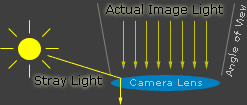
Digital Photography How-To: The Pros and Cons of Lens FlareLens flare - whether it's in the form of bright streaks, random polygons, or an overall washed-out look - is a hazard when you're shooting photos near a bright light source. From the intro: "Lens flare is created when non-image-forming light enters the lens and subsequently hits the camera's film or digital sensor. This often appears as a characteristic polygonal shape, with sides that depend on the shape of the lens diaphragm. Lens flare can lower the overall contrast of a photograph significantly and is often an undesired artifact; however, some types of flare may actually enhance the artistic meaning of a photo. Understanding lens flare can help you use it - or avoid it - in a way that best suits how you wish to portray the final image."


blogger templates | Make Money Online